Overview
🌌 The big picture
The quality of the AO correction depends on the available Natural Guide Stars (NGSs). The choice of guide stars affects wavefront sensing, tip-tilt correction, tomographic reconstruction, and ultimately the delivered Point Spread Function (PSF).
A set of guide stars used simultaneously forms an asterism. Depending on the AO architecture, an asterism may consist of:
- Single NGS — one guide star (e.g. ERIS NGS)
- Multiple NGSs — several guide stars combined (e.g. MAVIS)
Finding the optimal asterism is not straightforward, as the best solution depends on the guide-star brightness, their spatial distribution, the observing conditions, and the AO system itself.
The TipTop Asterism Selection module automatically evaluates large numbers of candidate guide-star configurations and predicts their expected AO performance using the analytical AO model.
🌟 Why it matters
Guide-star selection is a key step during observation preparation, particularly for laser-assisted AO systems where many possible NGS constellations may exist around a science target.
Because TipTop predicts AO performance in a fraction of a second, it becomes practical to evaluate hundreds or even thousands of candidate asterisms and rank them using physically meaningful metrics such as Strehl ratio (SR), Full width at half maximum (FWHM), encircled energy (EE), and residual jitter.
These capabilities are currently being integrated into ESO observation-preparation tools, including the ObsPrep environment within p2.
The same capability also enables large-scale sky coverage studies, where the best guide-star configuration is evaluated over thousands of randomly distributed fields to estimate the fraction of the sky accessible to a given AO system (see the interactive HARMONI MCAO Sky Coverage example here).
🤔 What TipTop adds
TipTop supports two complementary guide-star selection workflows:
| AO configuration | Function | Configuration block |
|---|---|---|
| LGS-assisted systems (SCAO-LGS, LTAO, MCAO, GLAO...) | asterismSelection | [ASTERISM_SELECTION] |
| NGS-only high-order systems (e.g. ERIS NGS mode) | hoAsterismSelection | [HO_ASTERISM_SELECTION] |
Both workflows rely on the same analytical AO model and follow the same general principle:
- Generate or import candidate guide-star configurations.
- Compute the expected AO performance for each candidate.
- Rank the candidates using objective performance metrics.
- Save the results for subsequent analysis or operational use.
Different strategies are available to generate candidate asterisms:
Sets— evaluate explicitly defined guide-star constellations.Singles1/Singles3— automatically build all one-star or three-star combinations from a list of candidate stars.File/FileMono— evaluate large catalogues or multiple sky fields.Generate— create synthetic datasets for testing and benchmarking.
The detailed description of each mode, together with the corresponding parameters and examples, is available on the Parameter Files page.
🔁 How it works (at a glance)
- Build candidates from your chosen mode.
- Run AO simulations for each asterism.
- Compute metrics per asterism (and per science target if applicable).
- Rank candidates in your analysis (by a scalar penalty/jitter, lower is better).
- Save outputs for fast reload and post-processing.
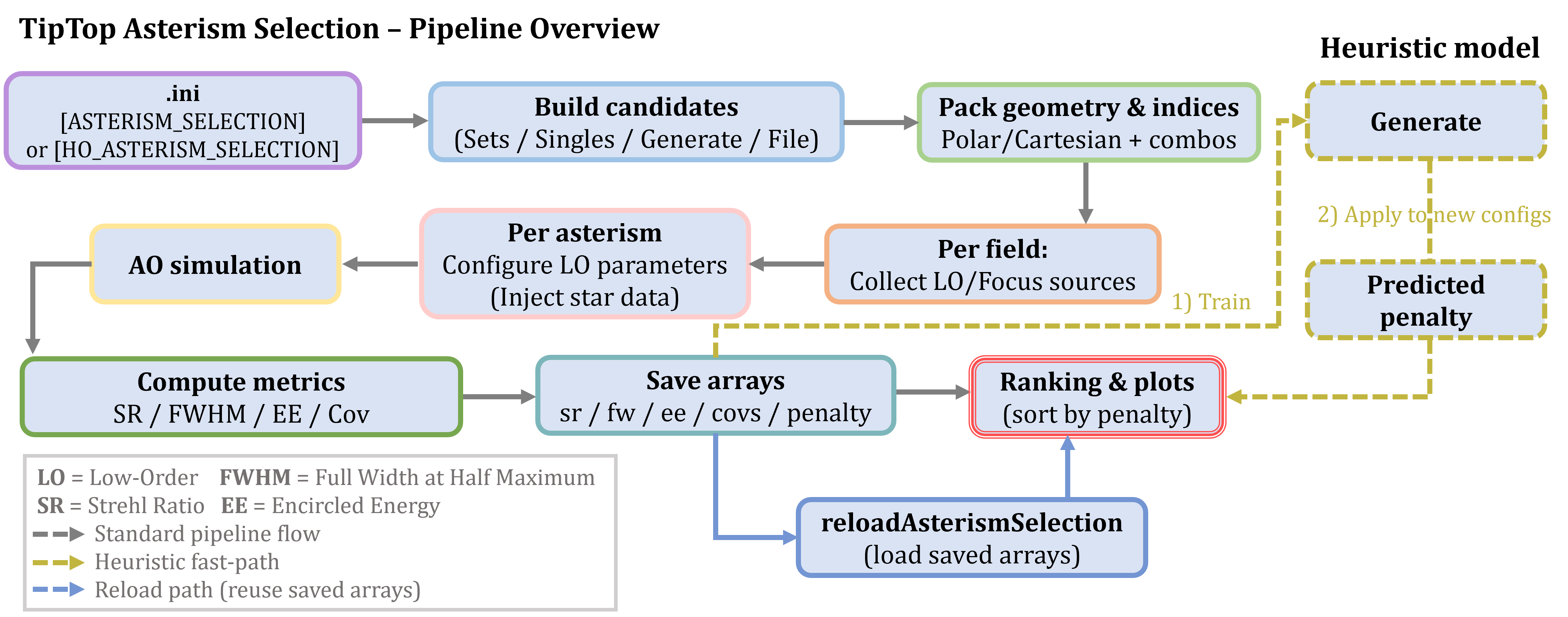
For a step-by-step run, see Tutorial - Asterism Selection.
📦 Outputs
For each evaluated guide-star configuration, TipTop computes and stores a set of AO-performance metrics that can be analysed immediately or reloaded later without recomputation.
The main outputs are:
| File | Description |
|---|---|
simulName+sr.npy | Strehl ratio |
simulName+fw.npy | Full Width at Half Maximum (FWHM) |
simulName+ee.npy | Encircled (or ensquared) energy |
simulName+covs.npy | Covariance ellipse parameters (LGS-assisted mode only) |
simulName+penalty.npy | Scalar ranking metric used to compare candidate asterisms |
For NGS-only high-order selection (hoAsterismSelection), the same metrics are produced using the _ho_ prefix (e.g. simulName_ho_sr.npy). Since no low-order loop is involved, covariance ellipses and penalty values are not generated.
The saved outputs can be reloaded at any time using reloadAsterismSelection(...), making it easy to perform additional analyses without rerunning the AO simulations (see the Running selections page).
🔧 Requirements
-
asterismSelectionrequires a valid[ASTERISM_SELECTION]section together with the corresponding low-order AO configuration. -
hoAsterismSelectiononly requires a[HO_ASTERISM_SELECTION]section. -
Candidate guide stars can be provided explicitly, generated automatically, or loaded from external catalogues.
✔️ Summary
The Asterism Selection module extends TipTop from AO PSF prediction to decision support.
Using the same analytical AO model employed throughout the TipTop ecosystem, it automatically evaluates large numbers of candidate guide-star configurations, predicts their expected AO performance, and ranks them using objective image-quality metrics. This makes guide-star selection practical for both individual observations and large-scale operational studies such as observation preparation and sky-coverage analyses.